


Once you learn how to make a paper rose with my Free Rolled Flower template you will be able to dream up virtually any diy project and want to add these Cricut Roses to it.
Cricut has always been known for its cutting performance and versatility. And with the new Cricut Maker, it delivers professional quality every time. There’s a few new blades, that you can use for cutting virtually any fabric, and you can see it in action with these Fabric Rolled Flowers, this post features the rotary blade, which is a blade to cut fabric for sewing.
Coupled with the Design Space app Cricut Maker Delivers the ultimate in professional level designs and you can use it to cut hundreds of materials including delicate fabrics and paper and card stock.
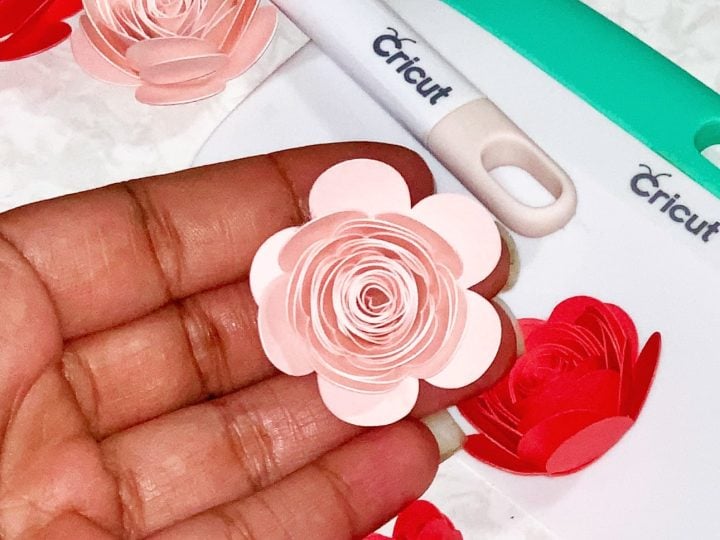
Paper roses and other flowers are super popular right now, especially with the popularity of the Cricut. And the Cricut also makes my free paper rose template so to cut.
And while paper crafting has been around for as long as there’s been paper, having a free template for and step by step tutorials is awesome–then you add in the ease of making a realistic and easy paper rose with a Cricut?! It’s a paper rose revolution!
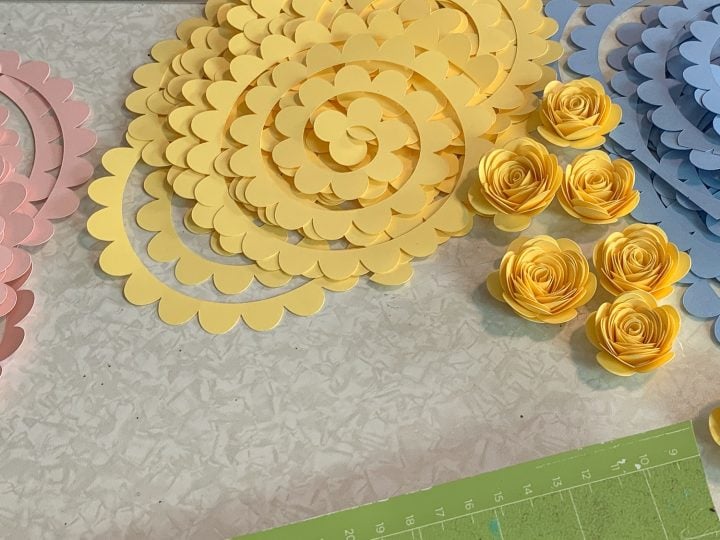
How To Make A Paper Flower
If you are wanting to learn how to make a paper rose, then you are in the right place. This is the easiest flower template I’ve ever used.
You can make giant paper flowers, a tiny paper rose, whatever. It’s just an easy paper rose complete tutorial–no matter what size flower you want to make.
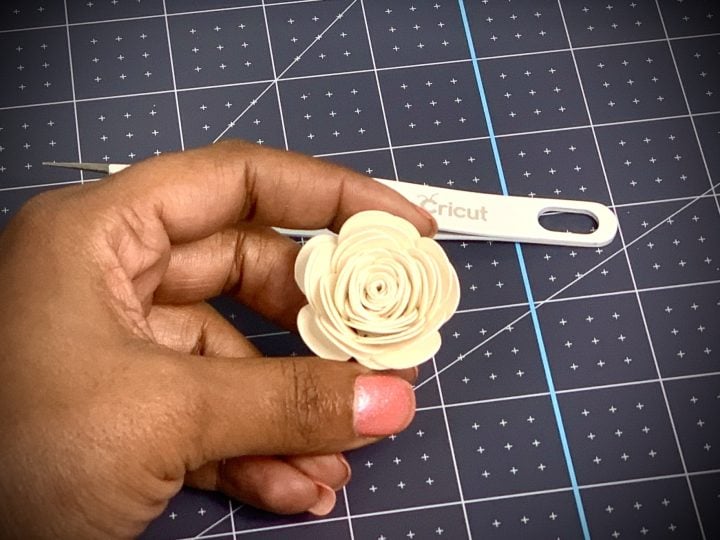
So, to make a paper rose, the complete tutorial duration is about 15 minutes, including the time it takes the Cricut to cut out 4 whole flowers–and you to roll them.
Also, with just a few supplies you can make beautiful a paper rose for you to use in shadow boxes, on cards even wedding bouquets.
I posted a video on my Instagram the other day, it was a time-lapse of me making showing me making the paper rose, I was asked for a tutorial so many times that I decided to give it to you.
What you need to make a rose out of paper is:
- Cricut cutting machine
- Spatula or weeding tool (to help get them off the mat)
- Light Grip Mat
- Cricut Cardstock Sampler or other cardstock 65lb weight
- Hot Glue Gun
- Glue Sticks
- Needle-nose tweezers (to roll them)
- My easy rose template, grab it below.
Firstly, all you have to do is load the template to Cricut Design Space and cut. After that, depending on the size you are going for you may have to adjust the DIY paper rose template.
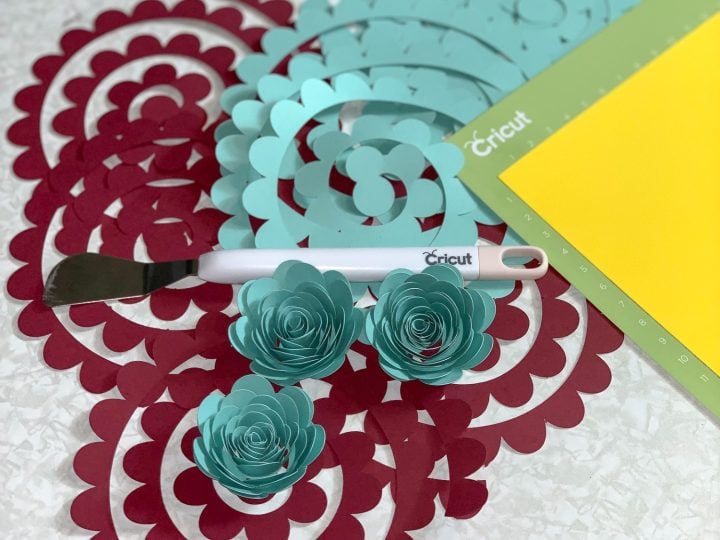
Tips For Making A Paper Rose
- Firstly, if you want the same size paper rose that I have, you don’t need to resize them at all and you can get two per printer sized pieces of colored paper and 4 per 12×12.
- Secondly, watch the roses video to learn how to roll your roses.
- In conclusion, use thick card stock paper for more a firm paper rose, or lighter card stock if you want to give it more texture and folds.
I was amazed at how easy it was to make these roses and how super cute they looked finished.
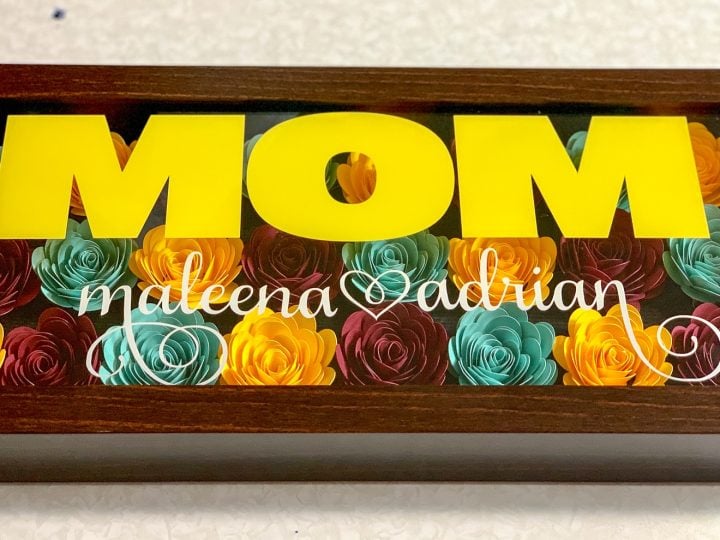
I made these beautiful paper rose shadow boxes for Mother’s day and my customers really loved them.
You can make these as small or as large as you like.
And with this tutorial, you will definitely be able to add a little beauty to so many things.
To sum it up, the possibilities are endless! Add a little glitter and give them some sparkle, dip the tips into a little paint or ink and recolor the edges, even use patterned paper to give it a more unique look.
I have plans of my own for teachers’ gifts, wedding bouquets, and even more shadow boxes.
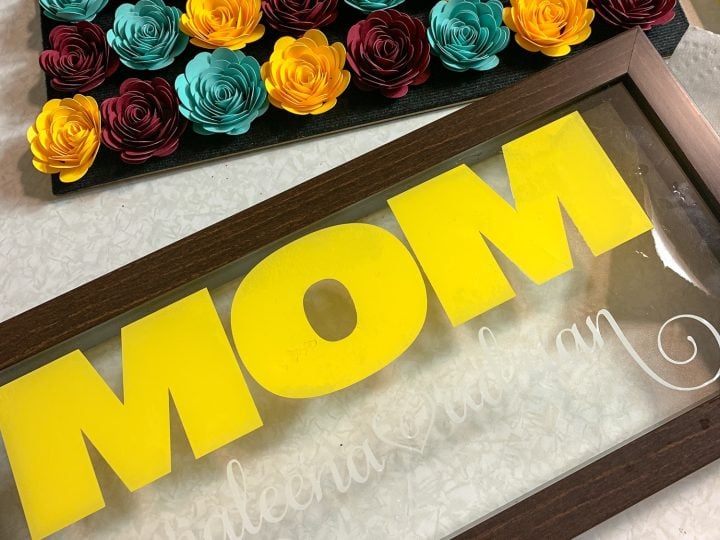
Shadow boxes are very popular right now, I have a quick tutorial on how to make an ombre paper flower shadow box, so make sure you are following along.
I would love for you to leave me a comment telling me what else you would like to see and I hope this tutorial makes it easy for you to make your own rose.
Looking for more projects using paper roses?
Grab The Step by Step Instructions and the Free Paper Rose Template Below.
How Make a Paper Rose.
Paper roses and other flowers are super popular right now, especially with the popularity of the Cricut. And the Cricut also makes my free paper rose template so to cut.
Materials
- Paper Rose Template
- Cardstock 65 LB
Tools
- Cricut
- Hot Glue Gun
- Glue Sticks
- Spatula
- or
- Weeding Tool
- Needle-nose tweezers
- Light Grip Mat
Instructions
- Load the paper rose cut file into Cricut Design Space
- Set the machine to cut the type of cardstock you are cutting
- Load the machine and cut out the paper flower template
- Using the spatula or weeding tool, carefully remove the paper from the mat
- Using the tweezers roll your roses (refer to the video to learn how to roll them)
- Place a dot of glue on the bottom and secure
- Secure the last petal with a dot of glue
- If you have any trouble, you can view the full tutorial by Pink on YouTube
Notes
Resize your roses up to 12x12 depending on your cutter.
Recommended Products
This post and some photos may contain Amazon and other affiliate links, I will be compensated if you make a purchase after clicking on my links.


I’m so pleased to find you. Your videos have helped me understand so much better,
Im signed up for your news letter but have not gotten the link for the flower template.
Am I missing something? Thank uYou.
You should get the flower template immediately and then a welcome series. Check your spam messages also
I subscribed and do not have the email anywhere, spam included. What can I do to get your rolled rose file? I’m so excited to give it a go!
Could you please email me the paper Rose cutout?
You have to sign up on the form and it will be emailed to you
Hi there, can you please sign me up and send me the free rose template… thank you so much DG
Click the link in the instructions under materials for the paper rose template, fill in your email and the paper rose SVG will be sent to you in an email. If you don’t have it in a few mins after you complete the form, check your spam messages.
@Jamela Porter, can you directly point out where the link is? I do not see it.
The SVG is located in the post above the instructions.
Could you please email me the paper rose template?
Click the link in the instructions under materials for the paper rose template, fill in your email and the paper rose SVG will be sent to you in an email. If you don’t have it in a few mins after you complete the form, check your spam messages.
Hi, I subscribed and received the email but Cricut is telling that it is in the wrong format. Can you help me out?
You need to make sure you are subscribing on the form of the file you want. I just tested these and they are working fine. Make sure to check your spam.
Please send me svg for flowersi couldn’t find it
Click the link in the instructions under materials for the paper rose template, fill in your email and the paper rose SVG will be sent to you in an email. If you don’t have it in a few mins after you complete the form, check your spam messages.
I will like to know we’re do I need to sign up I try but is telling me error for the flower template. You work is amazing
Is the link in the instructions not working?
Please send me the rolled flower Cricut pattern.
I would love the template
Check the instructions right above the cardstock.
Hello,
I was trying to sign up and get the free rose template but I am not seeing where to sign up to receive it. Could you help me please? Thank you!
what letters do you use for the mom and children names?
Can’t wait to try this project!! Ty so much for great information 🤗!!
Please send me the free template for the paper rose. THANK YOU
FYI video was AMAZING
Love this!
Clicked for free rose template but all I got was a planner page???
Hoping to receive the rose template. Have left my email address to receive updates and have received planner but no template. Could you please email. Regards Gai Dunn
I love all your ideas and making your projects are soo much fun. Thank you soo much for sharing
How do I get the free rose template please
Very excited to make some flowers!
Hi Jamela! These shadow boxes are gorgeous! What is the name of the fonts you use for this project?
Can you please email me Rose template? Thank you!
Could you please send me the flower tutorial.
mimamama4@msn.com
Would love the file
Hoping to receive the rose template. Have left my email address to receive updates
Hi Jamela,
I enjoyed watching you making these rolled roses.
It will be great if I receive the template and try them ..
God Blesses
Susana
Click the link in the instructions under materials for the paper rose template, fill in your email and the paper rose SVG will be sent to you in an email. If you don’t have it in a few mins after you complete the form, check your spam messages.
I am interested i. the free svg file.
Interested! Where do I sign up for the template! These projects are all so beautiful!
Click the link in the instructions under materials for the paper rose template, fill in your email and the paper rose SVG will be sent to you in an email. If you don’t have it in a few mins after you complete the form, check your spam messages.
Cant wait to use your paper rose template
Paper rose template
I wou love to make these but I don’t have a cricut. Is there a pdf or some file that I can print and cut by hand?
looking for the template to make a paper rose! thanks!
Love it!!! But can’t find the download for the template! I would love it if you could share it with me! Thank you
There is a button to click to get the file.
I too have requested the download and not received it. Any help would be much appreciated.
Check the instructions right above the cardstock.
How can I get the rose template? My email is wendyacardenas@yahoo.com
There is a link in the instructions, right above where it says cardstock.
Very cuteeee! can i get the template ? I will try. Its so fun
Check the instructions right above the cardstock.
Please send me your rose template!
Check the instructions right above the cardstock.
Can you please email me the rose template? Thank you so much and I’m glad I found your blog! <3
Check the instructions right above the cardstock.
Love your post!
I love your shadow box! Can you tell me where you got it and what size it is? Also, can you tell me what fonts you used for MOM and the names? I love it! I want to make it for my mother for Mother’s Day
The shadowbox should be linked in the post. The word mom is Impact font and the names are Samantha font, I used the alternates. You can find it here https://bit.ly/3aS3Aok.
I was looking for the paper rose template
There is a link in the instructions, right above where it says cardstock.
I would like the rose templet.
There is a link in the instructions, right above where it says cardstock.
this flowers are beautiful!
please email me the rose template. Want to make mothers day gifts. thank you.
There is a link in the instructions, right above where it says cardstock.
I would love the free template
Love your projects although I cant find the link to the template for your paper roses. If you could email it to me, I am trying to do a gift for our graduate. Thanks!
Check in the instructions, the link is there, I just fixed it.
I love your work. I can’t wait to start making paper roses. It will be a first for me.
Awesome! Come back and review the project when you do.
Thank you for the free rose template
Love this
Hi I signed up and got a confirmed subscription email but I still have not received the template.
I believe the wrong form was generating, try the form in the instructions near the materials.
I am interested in the mini flower SVG template. Thank you !!!
Check in the instructions under materials.
Thank You
the svg file the flowers is different then the one in your video the pieces seem more cut deep in the video then they actually are on the file any reason why?
It is the same flower.
Hello! I would love to get the free flower template.
Click the link in the instructions under materials for the paper rose template, fill in your email and the paper rose SVG will be sent to you in an email. If you don’t have it in a few mins after you complete the form, check your spam messages.
Looking for the free rose template
Click the link in the instructions under materials for the paper rose template, fill in your email and the paper rose SVG will be sent to you in an email. If you don’t have it in a few mins after you complete the form, check your spam messages.
Hello! I haven’t received the free rose template.
Click the link in the instructions under materials for the paper rose template, fill in your email and the paper rose SVG will be sent to you in an email. If you don’t have it in a few mins after you complete the form, check your spam messages.
Can you please email the rolled flower template
Click the link in the instructions under materials for the paper rose template, fill in your email and the paper rose SVG will be sent to you in an email. If you don’t have it in a few mins after you complete the form, check your spam messages.
Look so simple to make and something I can make into a posy for my mum to cheer her up in this lock down
Click the link in the instructions under materials for the paper rose template, fill in your email and the paper rose SVG will be sent to you in an email. If you don’t have it in a few mins after you complete the form, check your spam messages.
Would love to make some of these for the childrens grandparents in this lock down to cheer them up
Click the link in the instructions under materials for the paper rose template, fill in your email and the paper rose SVG will be sent to you in an email. If you don’t have it in a few mins after you complete the form, check your spam messages.
Would like free paper flower template Thank you
Click the link in the instructions under materials for the paper rose template, fill in your email and the paper rose SVG will be sent to you in an email. If you don’t have it in a few mins after you complete the form, check your spam messages.
Template for paper flowers
Click the link in the instructions under materials for the paper rose template, fill in your email and the paper rose SVG will be sent to you in an email. If you don’t have it in a few mins after you complete the form, check your spam messages.
I would love the flower template…. Love your tutorials! Thank you!
Click the link in the instructions under materials for the paper rose template, fill in your email and the paper rose SVG will be sent to you in an email. If you don’t have it in a few mins after you complete the form, check your spam messages.
I AM INTERESTED IN YOURE FREE TEMPLATE PLEASE.THANK YOU
Click the link in the instructions under materials for the paper rose template, fill in your email and the paper rose SVG will be sent to you in an email. If you don’t have it in a few mins after you complete the form, check your spam messages.
Your videos have helped me understand so much better how to make the rose flowers. Can not wait for the template.
Thanks
Click the link in the instructions under materials for the paper rose template, fill in your email and the paper rose SVG will be sent to you in an email. If you don’t have it in a few mins after you complete the form, check your spam messages.
Thank you for sharing your knowledge with us barely there newbies to the craft world. I hope I do you and the template justice.
Click the link in the instructions under materials for the paper rose template, fill in your email and the paper rose SVG will be sent to you in an email. If you don’t have it in a few mins after you complete the form, check your spam messages.
Could you please send me the paper flower template. Thank you
Click the link in the instructions under materials for the paper rose template, fill in your email and the paper rose SVG will be sent to you in an email. If you don’t have it in a few mins after you complete the form, check your spam messages.
Would like paper flower template
Click the link in the instructions under materials for the paper rose template, fill in your email and the paper rose SVG will be sent to you in an email. If you don’t have it in a few mins after you complete the form, check your spam messages.
Looking to receive the free rose template! Thank you!
Click the link in the instructions under materials for the paper rose template, fill in your email and the paper rose SVG will be sent to you in an email. If you don’t have it in a few mins after you complete the form, check your spam messages.
Could you please email me the template.
Many thanks
Click the link in the instructions under materials for the paper rose template, fill in your email and the paper rose SVG will be sent to you in an email. If you don’t have it in a few mins after you complete the form, check your spam messages.
Looking forward to receiving the paper rose template. I watched all your videos and can’t wait to make a shadow box.
Click the link in the instructions under materials for the paper rose template, fill in your email and the paper rose SVG will be sent to you in an email. If you don’t have it in a few mins after you complete the form, check your spam messages.
Is there another link for the template? I’ve clicked the link above card stock and have entered my email multiple times but have still yet to get it 😔
There is a link under materials in the instructions. If you entered there check your spam messages.
I loved watched the video on the paper roses, really excited and want to try out myself. Appreciate if you can shame me the template for paper roses to my email. Thanks in advance.
Click the link in the instructions under materials for the paper rose template, fill in your email and the paper rose SVG will be sent to you in an email. If you don’t have it in a few mins after you complete the form, check your spam messages.
Hi Sweetie, thanks for the tutorials, you are so talented! I would love to get the free rose flower template please.
Thanks so much for helpful the newbies!
Deb
Click the link in the instructions under materials for the paper rose template, fill in your email and the paper rose SVG will be sent to you in an email. If you don’t have it in a few mins after you complete the form, check your spam messages.
Jamela,
Thank you for the flower template! It was also a bit tricky for me to find the link, but after going through your whole page, I found where it was. I cannot believe how many people could not find it nor take the time to read the comments left beforehand to find the answer! >.<. Sorry girl, for all the repeated directions you had to post!
I was wondering how you got your roses to be different sizes? I like the smaller sized ones you cut on 8.5×11 paper, but I only have 12×12 cardstock. I know I could essentially size them however in DS, but I really do like the smaller size you specifically showed in your tutorial video. Please help! Thank you!!
The flower should cut as is when you load it. You will just have to adjust them on the sheet so you don’t waste a ton of paper.
Thank you for the file and the tutorial. Yours is the best one I’ve found! These are so pretty.
Hello. Cant find the link on your page. Can you please send me the file?
The Free SVG is in the post above the instructions.
Thank you so much for making the videos you have helped me understand so much better
Thabkyou for this. Look forward to making this for friends 40th
ILove to have your free svg I appreciate your work its add a beautiful thing to craft lover
thanks
The free paper rose file is in the post above the instructions.
Thank you for the rose template.
Hi,
I have read through all of the comments and I am putting my email in and I still didn’t get an email. I checked my spam as well and still don’t see anything. Is there any other way I can get the flower file?
The Form for the Free Rolled Paper Rose SVG is located in the post above the instructions.
Cant wait to try these.
I would love the rose template
The Free SVG is in the post above the instructions.
trying to figure out where to download the rose template from
The Form for the Free Rolled Paper Rose SVG is located in the post above the instructions.
I would love the template for the rose.
The SVG for the paper rose is in the post above the instructions.
I’m so excited to get my template
Can I get template
The Free SVG is in the post above the instructions.
can you send me the template for the paper rose?
The SVG is located in the post above the instructions.
I sure do like these but dont like to download
This was so informative and I can’t wait to make my own shadow box. Looking forward to the pattern for the rose.
Thank you
This is great!!!! I really want to know making paper rose and thank for your kindness
You’re Welcome
thankyou good step
Love these great work. Thank you for sharing.
Hi. Love this. But my flowers look a bit different. What am I doing wrong?
Hello this is amazing I recently got my cricut machine I would love to try it
Thank you so much for this wonderful template
The SVG is located in the post above the instructions.
Could I please get the rose template?
The form for the SVG is in the post above the instructions.
Nice work
please send me the paper rose template
You have to sign up for it, did you try that?
Thank you Jamela.
Can I use this design rose for commercial purpose?
I would also like to know if using design for commercial purpose is free.
thank you very much.
Thank you…it’s for my baby girl i want to make a shadow box
i’d like to try this! you make it look so easy
like to make the roses
I love it i have always love the way those roses look on shadowbox projects
Love the flowers!!
cool
I would like the free template. Thank you!
I love this!
It look so easy but I will see when I’m making them lol
Would love to do this rose craft with the students in our after school care program! Thank you.
wow amazing
looking to get the rose template all new t o this will be my first project makeing a shadow box for m mom mothers day thank u so much nice of you
I can’t wait to try these!
Jamela,
I have entered my email about 12 times and I wait and wait. I look at my spam also and it never comes. Would you help me with maybe what I am doing wrong. It sends me to flowdesk to enter my email. Is that right?
Thank you,
Kristie
I have updated, the form is located right before the instructions.
Hello! Really loved your work.
I checked the spam as well but didn’t receive the template.
Can you help me as to how can I get it?
I don’t see your email address at all. Maybe, you typed something wrong.
How to get free SVG for this paper flower template?
Fill out the form above the instructions.
Signed up but no email in inbox or spam just like most of the people in the comments. Maybe the email subscription is not working?
Were you on my email list in the past and maybe unsubscribed?
Signed up twice and still no template checked my
Junk and spam
Were you on my email list in the past and maybe unsubscribed?
I filled out the form with my name and email address, but I didn’t receive the paper rose svg, and I did check my spam folder. They are exactly what I am looking for, for the shadow box I am using.
Thank you in advance!
Were you maybe previously on my email list and unsubscribed?
What size did you make these flowers when cutting? Thank you!
The template is sized to what I made.
Can’t wait to try
Interested in the rose template
Fill out the form above the instructions.
Awesome. Thank you.
There is no link, at least none that I see.
It is a form right above the instructions.